In the world of infrastructure design, disconnected workflows are not just an inconvenience they are a productivity killer. Missed data handoffs, incompatible file formats, and isolated analysis tools force teams to duplicate work, introduce errors, and miss critical deadlines. That is exactly the problem that Autodesk Civil 3D was built to solve. As a purpose-built civil engineering design platform, Civil 3D brings workflows and interoperability together into a single, fully connected infrastructure design environment where design, analysis, and collaboration happen without disruption. Whether you are working on road alignments, drainage networks, grading plans, or large-scale land development, Civil 3D eliminates the gaps that slow teams down and empowers engineers to deliver smarter, faster, and more coordinated projects from start to finish.
What Makes Civil 3D a Truly Connected Design Environment
Infrastructure projects are inherently multidisciplinary. Road designers, drainage engineers, surveyors, GIS specialists, and project managers all need to work from the same data in real time, without stepping on each other’s work. Civil 3D addresses this challenge through a combination of dynamic object intelligence, integrated analysis tools, and open data exchange capabilities that keep everyone aligned throughout the entire project lifecycle.
Unlike traditional CAD environments where geometry is static and disconnected, Civil 3D uses intelligent design objects alignments, profiles, corridors, surfaces, and pipe networks that maintain live relationships with each other. Change the horizontal alignment of a road, and the profile, corridor, and drainage network update automatically. This kind of intelligent connectivity is what transforms Civil 3D from a drafting tool into a true design environment.
Integrated Drainage Analysis With InfoDrainage
One of the most significant workflow advancements in recent versions of Civil 3D is the deeper integration with InfoDrainage, Autodesk’s dedicated drainage and flood risk analysis software. This connection allows engineers to move seamlessly between Civil 3D design data and detailed hydrological and hydraulic analysis without the need for manual data re-entry or external file transfers.
From Design to Analysis Without Leaving Your Environment
With the Civil 3D and InfoDrainage integration, drainage networks designed in Civil 3D can be sent directly to InfoDrainage for analysis. Engineers can evaluate catchment behavior, pipe sizing, flow routing, and flood risk scenarios then push the refined results back into the Civil 3D model. This bidirectional connection ensures that drainage design decisions are always informed by accurate analysis, reducing costly late-stage revisions.
Why This Matters for Infrastructure Teams
Traditionally, drainage analysis required exporting data to a separate platform, running simulations manually, and then reconciling differences between what was analyzed and what was designed. With integrated InfoDrainage, that gap closes entirely. Teams gain confidence that their drainage networks are not just geometrically correct, but hydraulically sound and they achieve that confidence without disrupting the broader design workflow.
Enhanced 3D Model Viewing and Design Reviews in Autodesk Forma
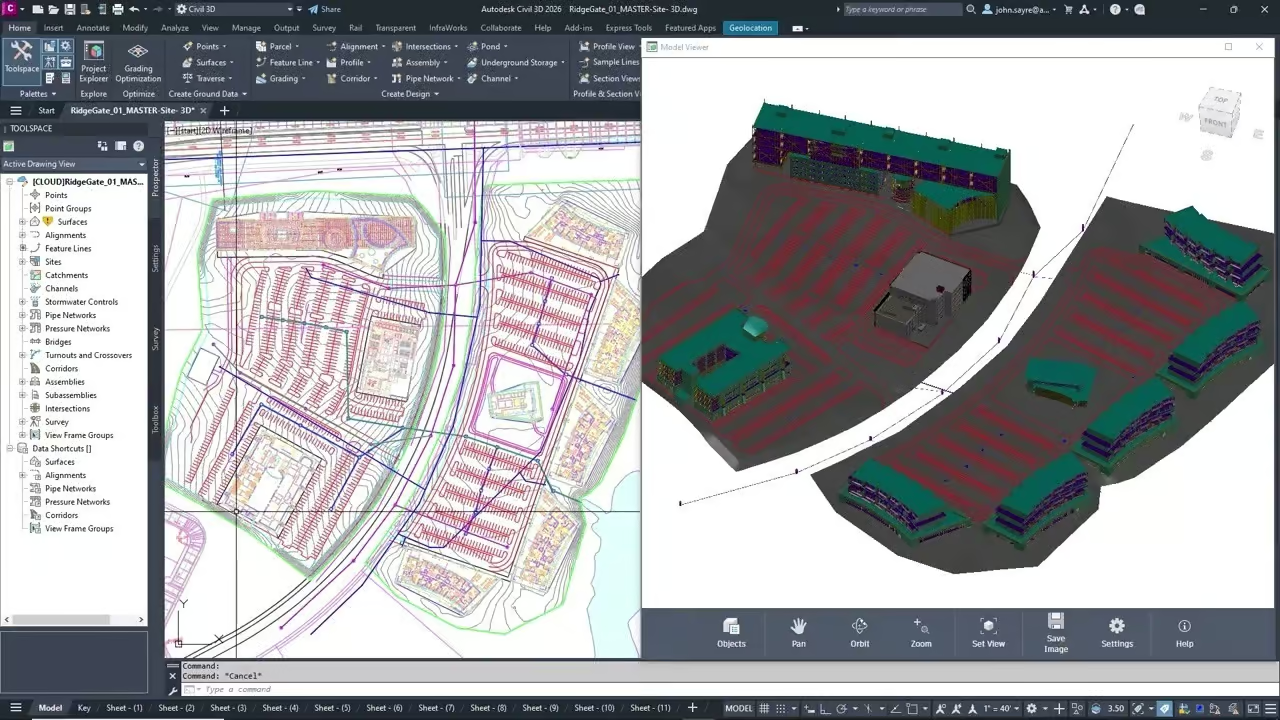
Collaboration is only effective when every stakeholder can see and understand the design. Civil 3D’s enhanced integration with Autodesk Forma brings 3D model visualization and alignment-aware design review capabilities directly into a cloud-connected environment accessible to the entire project team including those who do not work in Civil 3D every day.
Alignment-Aware Design Reviews
One of the standout features of the Civil 3D and Forma integration is alignment awareness. During design reviews in Forma, team members can view 3D corridor models in the context of their horizontal and vertical alignments, seeing how roads, earthworks, and structures relate to the surrounding terrain and site context. This spatial awareness dramatically improves the quality of review feedback, since stakeholders are no longer trying to interpret flat 2D drawings they are navigating through a real 3D representation of the project.
Broader Project Team Participation
Because Forma runs in a web browser, project owners, planners, environmental consultants, and other non-CAD users can participate meaningfully in design reviews without needing a full Civil 3D license. Comments, markups, and review decisions can be captured centrally and fed back to the design team reducing the communication overhead that typically slows down approval processes.
Improved Data Shortcuts and Project Exploration Tools
Managing large infrastructure projects means managing large volumes of interconnected data. Civil 3D’s Data Shortcuts system has long been the backbone of multi-user project collaboration, allowing different team members to reference shared design objects surfaces, alignments, profiles, pipe networks across multiple drawings without creating data redundancy.
What’s New in Data Shortcuts
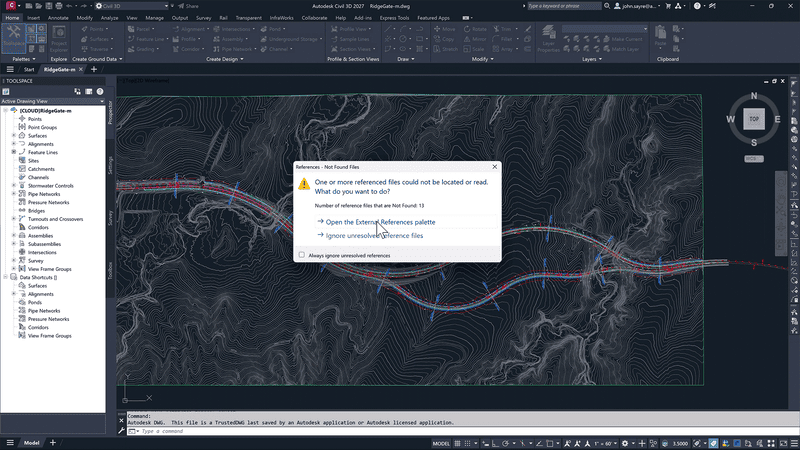
Recent improvements to Data Shortcuts in Civil 3D have made the system more robust and easier to manage. Engineers can now navigate and organize project data more efficiently, with clearer visibility into which drawings are referencing which shared objects and how changes propagate across the project. Broken references are easier to identify and repair, reducing the risk of teams unknowingly working from outdated data.
Project Exploration for Smarter Decision-Making
The enhanced project exploration tools give teams a higher-level view of the design data within a project. Rather than opening individual drawings to find information, users can browse and interrogate project assets from a centralized interface accelerating design decisions and making it easier to understand the full scope of a project at any given stage.
GIS Connectors for Efficient Handling of Complex Datasets
Infrastructure projects almost always begin with geographic data topographic surveys, land use maps, utility records, environmental constraints, and municipal boundaries. Civil 3D’s GIS connectors make it possible to bring this data directly into the design environment from industry-standard GIS platforms, eliminating the need for complex manual data preparation.
-
Import and reference live GIS layers directly within Civil 3D, keeping design context up to date as source data changes
-
Work with coordinate systems and projections accurately, ensuring spatial consistency between GIS and engineering data
-
Extract terrain, boundary, and utility data from GIS sources to seed Civil 3D surfaces, alignments, and network designs
-
Export Civil 3D design data back to GIS formats for asset management, planning, and regulatory reporting
-
Reduce manual data rework by maintaining a live connection between the GIS environment and the design model
This GIS connectivity is especially valuable for public infrastructure projects, where alignment with municipal geographic databases and environmental datasets is a regulatory requirement, not just a convenience.
Advancing Open Standards With IFC 4.3 Support
Interoperability in infrastructure design is not just about connecting Autodesk tools it is about connecting with the broader construction and asset management ecosystem. Civil 3D’s advancing support for IFC 4.3 (Industry Foundation Classes version 4.3) is a major step forward in this regard.
What Is IFC 4.3 and Why Does It Matter?
IFC 4.3 is the latest version of the open international standard for sharing building and infrastructure information across different software platforms. Unlike earlier versions of IFC, which were primarily focused on buildings, IFC 4.3 introduces dedicated schema support for infrastructure objects roads, bridges, railways, tunnels, ports, and waterways. This makes it far more applicable to the kind of work civil engineers do every day.
How Civil 3D Leverages IFC 4.3
With improved IFC 4.3 export capabilities, Civil 3D users can deliver infrastructure models in a neutral, open format that can be consumed by asset owners, facility managers, and construction teams using any IFC-compatible platform. This promotes openBIM workflows, reduces vendor lock-in, and ensures that the intelligence embedded in Civil 3D models alignments, surfaces, structures, and networks survives the transition from design to construction and beyond.
For public sector clients and projects governed by BIM mandates, this capability is increasingly non-negotiable. Civil 3D’s IFC 4.3 support positions design teams to comply with open data requirements without sacrificing the richness of their engineering model.
The Result: A Streamlined End-to-End Workflow
Taken together, these capabilities integrated drainage analysis, cloud-connected 3D review, improved data management, GIS connectivity, and open IFC exchange produce something greater than the sum of their parts: a design workflow where disruption is the exception, not the rule.
Engineers spend less time managing files, chasing missing data, and reconciling inconsistencies between platforms. Project managers gain real-time visibility into design status. Stakeholders can participate in meaningful reviews without technical barriers. And construction teams receive models they can trust complete, coordinated, and compatible with their own tools.
This is the vision behind Civil 3D’s connected infrastructure design environment, and it is increasingly a reality for teams that invest in fully leveraging the platform’s interoperability capabilities.
Frequently Asked Questions About Autodesk Civil 3D
What types of infrastructure projects is Civil 3D designed for?
Civil 3D is designed for a broad range of infrastructure projects including roads and highways, land development, site grading, stormwater and sanitary drainage design, survey and mapping, rail design, and utility corridor management. It is used by civil engineers, surveyors, and designers in both public and private sector organizations worldwide.
Does Civil 3D require other Autodesk products to work effectively?
Civil 3D is fully functional as a standalone platform, but its capabilities expand significantly when integrated with other Autodesk tools. Connections to InfoDrainage, Autodesk Forma, Autodesk Vault, and GIS platforms unlock workflows that would otherwise require manual data transfers and file conversions. Many teams use Civil 3D as the hub of a broader Autodesk infrastructure ecosystem.
How does Civil 3D handle collaboration across large project teams?
Civil 3D uses a Data Shortcuts system and Vault integration to enable multi-user collaboration on large projects. Shared design objects surfaces, alignments, profiles, pipe networks can be referenced across multiple drawings simultaneously, ensuring that all team members work from consistent, up-to-date project data. Cloud-connected tools like Autodesk Forma extend this collaboration to non-CAD stakeholders.
What is the benefit of IFC 4.3 support in Civil 3D?
IFC 4.3 is the first version of the IFC standard with comprehensive support for infrastructure objects like roads, bridges, and tunnels. Civil 3D’s IFC 4.3 export capabilities allow engineering teams to deliver open, vendor-neutral models that can be used by asset owners, construction contractors, and facility managers on any IFC-compatible platform supporting openBIM workflows and public sector BIM compliance requirements.
Can Civil 3D import and use GIS data directly?
Yes. Civil 3D includes GIS connector tools that allow users to import geographic data from industry-standard GIS platforms directly into the design environment. This includes terrain data, boundary layers, utility records, and environmental constraint maps. The connection supports accurate coordinate system handling, reducing the spatial discrepancies that commonly arise when GIS and CAD data are combined manually.
Connect data, streamline workflows, and collaborate seamlessly with Civil 3D interoperability. MORE INFO →