Quick answer.Bluebeam Max combines AI powered document review, intelligent drawing comparison and connected PDF to BIM coordination inside a single environment. Traditional collaboration tools split those same tasks across manual reviews, disconnected markups and separate communication threads. The practical difference shows up in schedule and rework. Teams using Bluebeam Max identify design changes faster, surface potential issues earlier, automate repetitive markup work and keep stakeholders aligned across desktop, web, mobile and BIM.
Where document coordination breaks down on real projects
Most construction teams do not lose time because people are careless. They lose it because information lives in too many places.
A revised sheet arrives by email. The superintendent has a marked up set on a tablet. The design team is working in Revit. The estimator is comparing two drawing versions page by page, looking for what moved. By the time everyone reconciles those inputs, the field has already installed something based on an older revision.
Legacy construction collaboration software was built to store and share files. That was useful when the main problem was distribution. The problem now is interpretation. Somebody still has to open both revisions, find every difference, decide what matters and tell the right people. That manual layer is where cost creep, RFIs and rework tend to originate.
What Bluebeam Max does differently
Bluebeam Max shifts the work from manual comparison to assisted review. Instead of asking your team to find changes, the platform surfaces them.
Smart Review
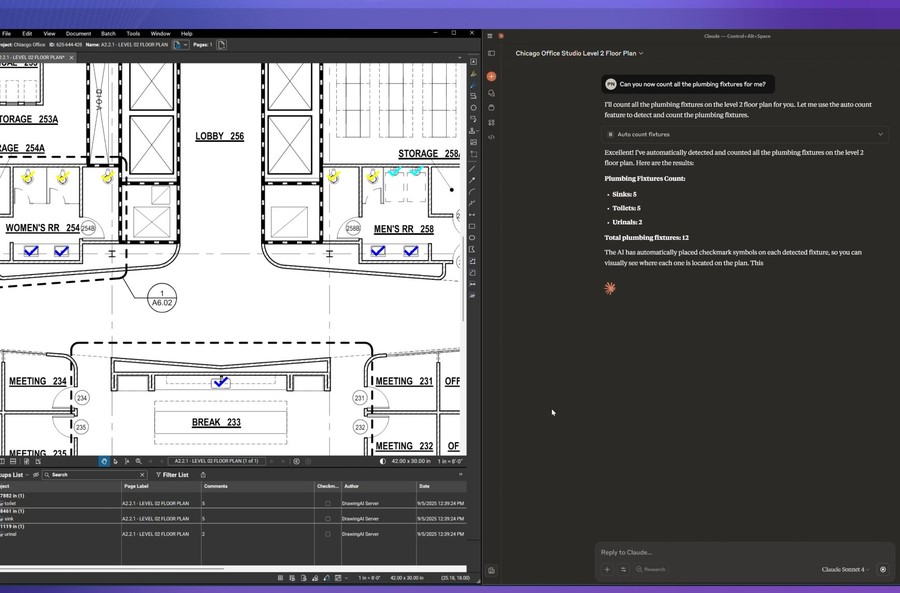
Smart Review analyzes documents and helps teams evaluate submittals, specifications and drawing packages without reading line by line. Reviewers focus on judgment calls rather than searching for what changed.
Smart Overlay
Comparing two revisions manually is slow and easy to get wrong. Smart Overlay aligns drawings intelligently and highlights differences, even when sheets are not scaled or positioned identically. What used to take an afternoon becomes a focused review session.
AI powered Stitching
Field scans, partial sheets and fragmented exports rarely arrive clean. AI powered Stitching assembles those pieces into usable, coordinated documents so the team is not rebuilding sets by hand.
Magic Markups
Repetitive markup work adds up across a large package. Magic Markups automates recurring annotation tasks, which keeps documentation consistent between reviewers and protects the audit trail.
Connected Studio Sessions with Revit
This is the clearest departure from conventional construction document management software. Studio Sessions connect PDF based review with the BIM environment, so a comment raised during coordination does not get stranded in a separate system. Design intent, markups and model context stay connected.
How it works in a normal week
A general contractor receives Revision 4 of the architectural set. Smart Overlay compares it against Revision 3 and flags dimensional and layout changes. The project engineer reviews the flagged items instead of the entire package, then uses Magic Markups to apply standardized annotations across affected sheets.
The coordination team opens a Connected Studio Session with Revit so the design side sees the same markups in model context. Field staff access the current set on mobile, add photos and questions, and everything writes back to one shared record.
No parallel email chain. No third version of the truth.
What separates it from conventional platforms
Traditional tools generally handle three things well. Storage, permissions and version numbering. Bluebeam Max adds analysis, automation and BIM connection on top of that foundation.
Reviews become assisted rather than fully manual. Markups stay connected to the model instead of ending as flat annotations. Mobile, web and desktop users work in the same environment rather than exchanging exports. For teams already using construction PDF markup software, this is a meaningful jump in capability, not a cosmetic interface change.
Scenarios where the difference is obvious
Fast track projects with frequent revisions. When drawings change weekly, manual comparison stops being viable. Automated overlay keeps review cycles from becoming the bottleneck.
Large submittal packages. Mechanical and electrical submittals with hundreds of pages consume senior staff time. Assisted review reallocates that attention to exceptions.
Distributed teams. Multiple offices, subcontractors and field crews need one shared source of documentation with consistent markup standards.
Owner facing documentation. Turnover packages and closeout records benefit from traceable, consistently annotated documents rather than reconstructed folders.
How to evaluate Bluebeam alternatives without wasting a quarter
Teams comparing Bluebeam alternatives often focus on feature lists. A more useful approach is to test against your own workflow.
Run a pilot on one active project. Measure how long revision comparison takes today versus with assisted overlay. Check whether markups actually reach the design team or die in a separate thread. Confirm mobile behavior in real field conditions, not in a demo environment. Review how licensing scales as project teams grow and contract.
Most organizations searching for the best construction collaboration tools discover the deciding factor is not capability on paper. It is adoption. A platform your field staff will not open produces zero value regardless of what it does.
Recommendations before you roll it out
Standardize markup conventions before deployment so annotations mean the same thing across offices. Define who owns document control on each project. Train by role rather than by feature, since a superintendent and a project engineer need different things from the same platform. Start with one project team, document what improved, then expand with evidence instead of assumptions.
Implementation quality drives results here more than the software itself. Teams that treat this as a workflow decision rather than a software purchase see faster returns.
Talk through the fit for your projects
Bluebeam Max combines AI and connected collaboration to improve construction document coordination beyond traditional review methods. If your team is spending more time reconciling documents than building, it is worth reviewing where the current process is losing hours.
MicroCAD works with AEC organizations to evaluate, deploy and support Bluebeam Max with a consultative approach, from initial assessment through training and ongoing support. Our team can help you map current workflows, identify realistic time savings and structure a rollout your project teams will actually use.