Chaos Enscape Collection Pricing & Licenses | MicroCAD

Chaos Enscape Collection

The Enscape Collection is your complete design visualization and presentation toolkit, built for architects and design teams who need faster workflows, immersive presentations, AI-powered ideation, and sustainable design insights in one connected ecosystem.
 

  • Real-time visualization directly inside your CAD workflow.
  • Faster design decisions through live rendering and AI-powered exploration.
  • Data-driven sustainability insights during early project stages.
  • Cinematic presentations and large-scene storytelling tools.
  • Connected workflows from concept design to final presentation.
  • One complete subscription with integrated visualization, AI, and performance analysis tools.

Products Included in the Collection
Chaos Enscape Collection
chaos enscape

Enscape – For Real Time Visualization

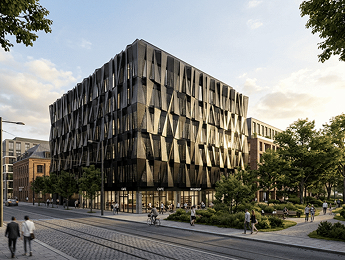
Enscape is a real-time rendering and virtual walkthrough plugin for Revit, SketchUp, Rhino, Archicad, and Vectorworks. It connects directly to your design software so you can visualize projects instantly while designing.

  • Real-time rendering and walkthroughs
  • Instant design feedback
  • VR-ready presentations
  • Seamless BIM integration
Enscape real-time rendering
enscape envision

Envision – For Cinematic Storytelling

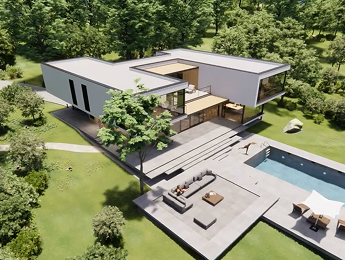
Chaos Envision transforms your Enscape scenes into immersive presentations with advanced animations, large-scene support, and cinematic visual storytelling.

  • Real-time cinematic animations
  • Animated people and traffic
  • Large project scene assembly
  • High-quality presentation visuals
architectural visualization software
chaos veras

Veras – For AI-Powered Ideation

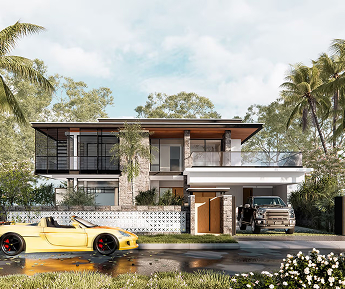
Veras is an AI visualization tool that generates render variations, conceptual ideas, and image-to-video content directly from your models and sketches in seconds.

  • AI-generated design concepts
  • Image-to-video generation
  • Fast rendering variations
  • Integrated inside your workflow
Enscape visualization software
chaos cosmos

Cosmos – For Ready-to-Use Assets

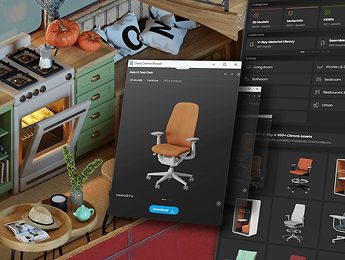
Chaos Cosmos gives you access to a large library of high-quality 3D assets, materials, HDRIs, vegetation, and furniture ready to use in your projects.

  • Drag-and-drop asset library
  • Vegetation and furniture assets
  • High-quality materials and HDRIs
  • Faster scene creation
Chaos Enscape rendering tools
enscape impact

Impact – For Sustainable Design Insights

Chaos Impact helps architects evaluate energy efficiency, daylight, and carbon impact during early-stage design to support smarter sustainability decisions.

  • Real-time building performance analysis
  • Carbon impact evaluation
  • Energy and daylight insights
  • Early-stage sustainability workflows

Why Choose Enscape Collection

Everything Connected in One Workflow
Move from concept design to final presentation without switching between disconnected tools.

Faster Design Iteration
Visualize changes instantly, test ideas faster, and reduce production time with AI-powered workflows.

Better Client Presentations
Create immersive walkthroughs, cinematic animations, and presentation-ready visuals directly from your design models.

Smarter Design Decisions
Use real-time sustainability insights and AI-enhanced visualization tools to improve project outcomes earlier in the process.

Better Value
The Collection combines multiple professional tools into one subscription, reducing software costs while expanding your workflow capabilities.

Chaos Enscape Collection

Chaos Credits
Give you access to AI-powered tools and cloud services across the Chaos ecosystem, including Veras AI features, image enhancement, image-to-video generation, and cloud rendering. Every Collection includes a monthly credit allowance, and additional credits can be purchased anytime for larger projects or higher usage needs.

Frequently Asked Questions

What is the Chaos Enscape Collection?
The Chaos Enscape Collection is a subscription bundle that brings together real-time visualization, cinematic presentation, AI-powered ideation, 3D assets, and sustainability analysis tools in one connected workflow. It is designed for architects and design teams who want to move from early concept to final client presentation without switching between disconnected applications.
Which products are included in the Enscape Collection?
The collection includes five tools: Enscape for real-time rendering and walkthroughs, Chaos Envision for cinematic animations and large-scene storytelling, Veras for AI-generated design concepts and image-to-video content, Chaos Cosmos for ready-to-use 3D assets, materials, and HDRIs, and Chaos Impact for early-stage energy, daylight, and carbon analysis.
Which design software does Enscape work with?
Enscape works as a plugin for Revit, SketchUp, Rhino, Archicad, and Vectorworks. Because it connects directly to your modeling software, changes you make to the design are reflected in the visualization instantly, so your team can review and adjust projects without exporting files to a separate rendering application.
What is the difference between Enscape and Chaos Envision?
Enscape is focused on real-time visualization while you design, giving instant feedback, walkthroughs, and VR-ready views. Chaos Envision builds on your Enscape scenes to create cinematic presentations, with advanced animations, animated people and traffic, and support for assembling large project scenes. In short, Enscape helps you design and review; Envision helps you tell the project’s story.
How does Veras use AI in the design process?
Veras uses AI to generate rendering variations and conceptual ideas directly from your 3D models or sketches in seconds. It also supports image-to-video generation. This makes it useful in early design phases, when teams want to explore materials, styles, and moods quickly before committing time to detailed modeling and final renders.
Can Chaos Impact help with sustainability goals in early design?
Yes. Chaos Impact provides building performance insights, including energy efficiency, daylight, and carbon impact, during the early stages of a project. Evaluating these factors while the design is still flexible helps architects make more informed decisions before changes become costly and difficult to implement.
Is the Enscape Collection a better option than buying Enscape alone?
It depends on your workflow. If your team only needs real-time rendering inside your CAD or BIM tool, Enscape alone may be enough. If you also produce cinematic presentations, explore concepts with AI, rely on asset libraries, or need sustainability insights, the collection combines those capabilities in a single subscription and can reduce the cost of licensing separate tools.
How can I get the Enscape Collection, training, and support through MicroCAD?
As a Chaos partner with more than 30 years of experience serving AEC firms, MicroCAD helps your team choose the right Chaos licensing, set up the tools inside your existing workflow, and train with experienced instructors. Contact our team to request a quote or talk to an expert about which option fits your projects best.