Quick answer. The most valuable tools inside autodesk Forma Design Collaboration are not new arrivals. Document management, model coordination, design collaboration, change tracking, Revit Cloud Worksharing, and the connections to Civil 3D and Plant 3D have supported AECO teams for years. What has changed is performance, connectivity, and workflow depth. Teams keep the processes they already trust and gain faster, cleaner coordination across the full project lifecycle.
Why projects lose time long before anyone breaks ground
Ask any project lead where schedule slips begin, and the answer rarely involves the model itself. It involves the space between disciplines. An architect updates a core wall. Structural finds out three days later. MEP finds out when the clash report lands. Someone is still working from a drawing set that was superseded last Thursday.
That gap is expensive, and it does not close by adding more meetings. It closes when every discipline works from the same trusted project information, with visibility into what changed and who changed it. This is the specific problem that mature design collaboration software was built to solve, and it is the reason AECO firms keep investing in connected cloud environments rather than another folder structure on a shared drive.
What Forma Design Collaboration actually brings together
The value here is consolidation. Instead of stitching together separate platforms for files, models, markups, and reviews, teams get one connected environment where each capability reinforces the others.
Document management that holds up under audit
Controlled versioning, permissions by role, transmittal history, and approval states. When a subcontractor asks which sheet is current, the answer is unambiguous. That single detail eliminates a surprising volume of rework.
Model coordination across disciplines
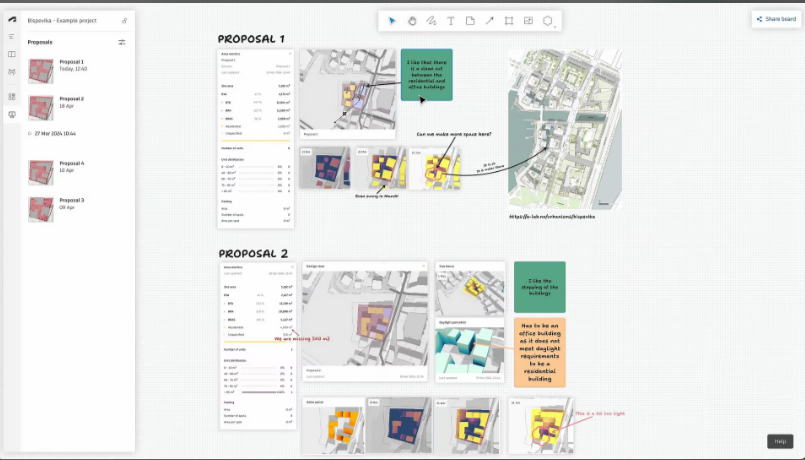
Automated clash detection paired with issue assignment turns coordination from a weekly presentation into a running process. Issues get owners, due dates, and a documented resolution path rather than living inside meeting notes.
Change tracking that answers the real question
Not just what changed, but what it affects downstream. Visual comparison between model versions lets a structural engineer see exactly which elements moved between publishes, without opening a side by side review session.
Revit Cloud Worksharing for distributed teams
Multiple authors, multiple offices, one central model in the cloud. Sync times have improved considerably, and remote teams no longer depend on VPN performance to stay productive. This is where real-time design collaboration stops being a marketing phrase and becomes a measurable difference in daily throughput.
Civil 3D and Plant 3D connectivity
Infrastructure and process plant work no longer sits outside the coordination loop. Data shortcuts, referenced surfaces, and plant models participate in the same shared environment as vertical building data.
How it works in a normal week
Design teams author in their native applications. Work publishes to the connected cloud environment, where it becomes visible to every discipline with access. Coordination runs against published models, issues route to responsible parties, and reviews carry a documented approval trail.
Nobody changes how they model. The authoring workflow stays intact. What changes is the speed at which the rest of the team sees the result and responds to it. That is the practical definition of a well implemented online design collaboration platform, and it explains why adoption succeeds when the tooling respects existing habits instead of replacing them.
What separates mature platforms from generic file sharing
Plenty of vendors offer cloud storage with comment threads and call it collaboration. The distinction becomes obvious under load.
Discipline aware data means the platform understands model geometry, not just file names. Traceability means every issue, markup, and version carries a documented history that survives staff turnover and holds up in a claims conversation. Scalability means a two hundred person joint venture behaves the same as a five person studio. Interoperability means the platform reads what your consultants actually send you.
Firms evaluating the best design collaboration tools often start with feature comparisons and end up choosing based on how well the platform handles their messiest project, not their cleanest one. That instinct is correct.
Where teams feel the difference
A multi office architecture firm running Revit Cloud Worksharing across three time zones eliminates the nightly model handoff ritual entirely. Work continues on a rolling basis instead of stopping at each geographic boundary.
A design build contractor coordinating structural steel against MEP routing catches interference during design development rather than fabrication. The cost difference between those two moments is not subtle.
An infrastructure team connecting Civil 3D corridor data to building models keeps site grading and foundation design aligned as both evolve, instead of reconciling them at the end.
A media and manufacturing group managing large asset libraries gains version control that scales past what shared network storage can reasonably support.
Recommendations before you scale adoption
Start with one project team and one clear pain point. Coordination usually delivers the fastest visible win. Define permission structures and naming conventions before you migrate content, because cleanup later costs far more than planning now. Train the people who will actually use the platform daily, not just the BIM manager. Measure something specific, whether that is issue resolution time, RFI volume, or model sync duration, so the business case writes itself after quarter one.
And connect the tools you already own. Many firms discover they are licensed for capabilities they never activated. A structured review of your current entitlements often uncovers value that requires no additional spend, only configuration and guidance.
Familiar tools, stronger foundations
The trusted design collaboration tools teams rely on continue to improve while preserving the workflows they already know. That continuity is the point. Firms do not need another platform migration. They need the environment they already trust to run faster, connect wider, and document better.
MicroCAD works with AECO, manufacturing, and media organizations across the United States to implement, configure, and support these environments, including complementary solutions such as Autodesk BIMcollab Pro for teams that need deeper issue management across their design team collaboration tools. Our consultants have run these deployments in production environments, not in demos.
If your coordination process is working but not scaling, that is usually a configuration conversation, not a software replacement conversation. We are happy to have it