3ds Max 2027 expands modeling, animation, and scene creation with tools that reduce manual cleanup and deliver more accurate geometry from the first pass. The release introduces Smart Bevel for cleaner post Boolean results, Noise Plus for advanced procedural effects, custom extrusion directions, refined Spline Chamfer controls, and the new Field Helper for precise component selections, alongside improvements to viewport display, modifier performance, retopology, materials, color management, and OpenUSD integration.
The hidden cost of manual cleanup in production pipelines
Most studios and design teams do not lose hours to modeling itself. They lose them to correction. A Boolean operation leaves messy edge flow. A procedural pattern needs three modifiers stacked to approximate what the art director asked for. A selection has to be redone by hand every time the mesh changes.
Multiply that across a project with hundreds of assets and the effect becomes measurable in schedule and budget. Teams working on architectural visualization deadlines, product renders for manufacturing clients, or episodic content delivery feel it first, because rework compresses the review cycle at exactly the moment there is no room left.
That is the specific problem this release targets.
What changes with the 3ds Max new features in 2027
The 3ds Max new features in this version share a common logic. They move accuracy earlier in the process instead of pushing correction later.
Smart Bevel for cleaner post Boolean geometry
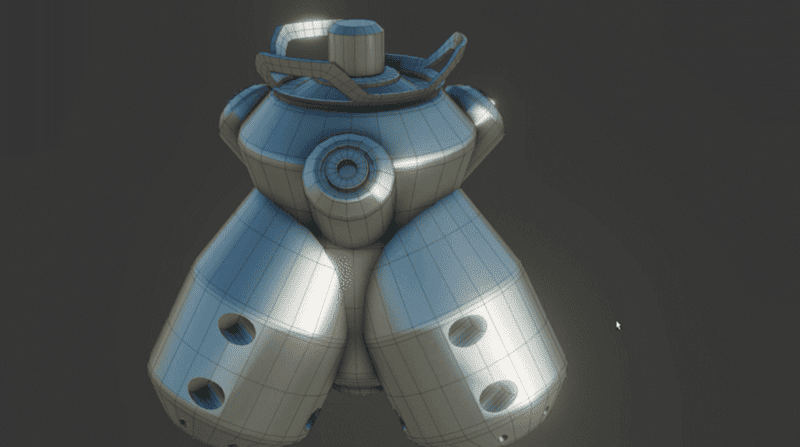
Boolean operations have always been fast to execute and slow to clean. Smart Bevel produces more predictable geometry after Boolean work, which means fewer manual edge adjustments before the asset moves to shading or lighting. For hard surface modeling in manufacturing and product design, this alone changes how quickly a concept becomes render ready.
Noise Plus for advanced procedural effects
Noise Plus expands procedural control for surfaces, displacement, and organic variation. Instead of layering workarounds, artists get a more capable base tool that behaves consistently across scenes and stays editable through revisions.
Custom extrusion directions and improved Spline Chamfer
Extrusion is no longer limited to the direction the software assumes you want. Custom extrusion directions give control over complex forms without building temporary helper geometry. Improved Spline Chamfer controls refine profile creation, which matters for architectural detailing, molding, structural components, and any workflow built on curve based modeling.
Field Helper for precise component selections
Field Helper allows selections driven by spatial fields rather than manual picking. Selections stay coherent when the mesh updates, which removes one of the most repetitive tasks in animation and effects work.
Performance and pipeline improvements that support larger scenes
Beyond modeling, the release strengthens the parts of the workflow that determine whether a scene stays workable as it grows.
Viewport display improvements and better modifier performance keep interaction responsive on heavy scenes. Retopology updates support cleaner mesh output for downstream use. Material handling and color management refinements protect visual consistency between departments and vendors, which is critical when a project passes through multiple studios.
OpenUSD integration continues to mature, aligning 3ds Max with pipelines that already move data across Maya, Revit, Inventor, and third party applications. For AEC teams delivering coordinated models, that interoperability reduces translation loss between design authoring and visualization.
The Autodesk Assistant Tech Preview also appears in product, giving contextual guidance on features and workflows. It is not a replacement for training, but it shortens the distance between a question and an answer during production.
Planning your upgrade around 3ds Max system requirements
Before deploying a new version across a team, verify 3ds Max system requirements against your current hardware. Larger scenes, denser meshes, and GPU accelerated viewport work reward dedicated professional graphics, certified drivers, generous system memory, and fast local storage.
Two recommendations that consistently prevent problems:
Validate one workstation first with a representative project file, not a sample scene. Confirm plugin and renderer compatibility before company wide rollout, since third party tools often update on their own schedule.
Teams that skip this step usually discover the gap mid project, which is the most expensive moment to find it.
Where the 2027 updates pay off in real projects
An architecture firm producing competition renders benefits from Spline Chamfer refinements and cleaner Boolean geometry when detailing facades and interior elements under deadline.
A manufacturer preparing marketing visuals for a new product line gains from custom extrusion directions and improved retopology, moving from engineering geometry to presentation quality assets with fewer intermediate steps.
A media and entertainment studio building environments benefits most from Noise Plus, Field Helper, and viewport performance, because iteration count is the real currency in look development.
Learning curve, tutorials, and team adoption
Any 3ds Max tutorial worth the time should be tied to your actual production context. Generic feature walkthroughs explain what a tool does. Guided implementation explains where it belongs in your pipeline, which modifiers it replaces, and how it affects file handoff.
Teams adopting new versions successfully usually pair short focused training with a pilot project. The goal is not to learn every feature. It is to change three or four habits that consume the most hours.
Choosing the right 3D modeling software for your workflow
Comparisons around 3ds Max vs Blender come up in almost every evaluation, and the honest answer depends on your environment rather than on feature counts. Blender is capable and accessible. 3ds Max remains the stronger fit for organizations that need enterprise licensing, deep interoperability with Revit and Inventor, established plugin ecosystems, deployment management, and vendor accountability across long project cycles.
If your 3D modeling software decision involves multiple departments, client compliance requirements, and pipelines that already run on Autodesk data, continuity usually outweighs any single tool advantage.
Moving forward with the right licensing and support
3ds Max 2027 delivers smarter modeling capabilities, refined animation tools, and stronger scene development. Our team helps organizations evaluate hardware readiness, plan deployment, and structure the right Autodesk 3ds Max license for the size and pace of their projects, with implementation support and training that keep production running during the transition.