
Autodesk Inventor License
Autodesk Inventor 2027: A Complete Design and Engineering Toolset
Inventor 2027 is here and better than ever
Inventor 3D CAD software offers professional-grade tools for mechanical design, documentation, and product simulation. With the 2027 release, Inventor introduces AI-driven automation through the new Autodesk Assistant, visual iLogic Codeblocks, and a set of highly-requested modeling enhancements — all purpose-built to help engineers design faster and collaborate more effectively.
What you can do with Autodesk Inventor

Share feedback with built-in collaboration tools
- Work with anyone, anywhere no matter what CAD software they use.
- Collect feedback from stakeholders wherever they are using cloud-based design review.
- Follow the product development lifecycle with one data model.

Satisfy demands for custom products and automate processes
- Design efficiently using specialized industry toolsets.
- Enable design automation powered by iLogic.
- Access Inventor API to create add-ins.
- Access Forge Design Automation API for running job processes in the cloud.

BIM interoperability
- Increase your sales opportunities while participating in BIM projects.
- Use data exchanges for a highly collaborative workflow when creating custom fabrications around Revit data.
- Include necessary authoring metadata and export your designs to a BIM-ready Revit format.
Use Inventor with other Autodesk Software

Inventor + AutoCAD
Connect 2D and 3D workflows—use the right tool for every mechanical design job. (video: 1:39 min.)

Inventor + Fusion
Explore a greater number of high-performing design alternatives—many that you’d never think of on your own. (video: 2:15 min.)
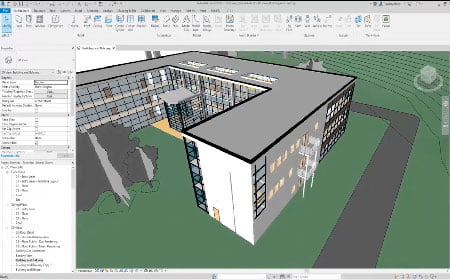
Inventor + Revit
Increase your sales opportunities while participating in BIM projects. (video: 2:10 min.)
Why use Inventor?

Improve product performance
Use powerful 3D modeling and simulation capabilities to design and optimize performance.

Reduce repetitive tasks
Quickly create customizable configurations of your designs and automate common tasks.

Boost collaboration
Connect your designs with incoming customer data and share ideas in a secure cloud-based service.

Product Design & Manufacturing Collection
Extend the capabilities of Inventor with the collection
The collection is a powerful set of applications that provides extended capabilities to Inventor and AutoCAD for engineers who design complex and custom products, equipment, and systems.
Product Design & Manufacturing Collection includes:

AutoCAD

Inventor Nastran

Fusion

Factory Design Utilities

Inventor Tolerance Analysis

+ More
Learn how you can do more with Inventor

Watch video (1:50 min.)
Best practices for 2D and 3D design
Work in Inventor and AutoCAD to unlock capabilities that benefit the entire product development cycle.

Watch video (2:34 min.)
Explore a complete product development solution
See how the powerful integrated tools for Inventor bring your most ambitious designs to life.
Frequently Asked Questions
An Autodesk Inventor license gives your engineering team access to professional 3D mechanical design, documentation, and simulation tools on a subscription basis. The Inventor 2027 release adds AI assistance, visual automation, and expanded interoperability, and MicroCAD helps you select the right license type, deploy it, and support it long term.
What is included in an Autodesk Inventor license?
An Inventor subscription includes the full 3D CAD software for mechanical design, parametric and freeform modeling, assembly design, sheet metal, frame generator, drawing documentation, and design simulation. It also includes cloud collaboration tools, the Inventor API for custom add ins, and access to Autodesk support resources.
Licenses are typically sold as annual or multiyear subscriptions per named user, with the option to add more seats as your team grows. If your workflows extend beyond mechanical design, the Product Design & Manufacturing Collection may be a better fit.
What is new in Autodesk Inventor 2027?
Inventor 2027 focuses on automation, everyday productivity, and connectivity across the Autodesk ecosystem. The most significant additions are:
Autodesk Assistant, an AI powered assistant with 37 built in tools for analyzing models, creating model states, suppressing components, and generating parameters without writing code.
iLogic Codeblocks, a drag and drop visual programming experience that makes design automation accessible to engineers who do not script.
Assembly Content Center expansion, which lets you publish and reuse complete assemblies with metadata, previews, and configurable model states.
A dedicated Slot command, enhanced assembly mirroring, and stronger data exchange with third party CAD tools.
Do I need to upgrade to Inventor 2027 if I already own a license?
If you have an active subscription, the upgrade is included at no additional cost. You can download and install Inventor 2027 from your Autodesk account and continue running previous versions in parallel while you validate your projects.
Inventor 2027 opens files created in earlier releases. Files saved in 2027 are not backward compatible with older versions, so most engineering teams plan a coordinated migration across the department. MicroCAD supports version transitions with deployment planning, testing, and technical support so production work is never interrupted.
Do I need programming skills to use iLogic automation?
No. Traditionally, iLogic required writing rules in code, which limited adoption to a small group of power users. Codeblocks changes that by replacing scripting with intuitive drag and drop logic, so designers can build automation workflows step by step.
Codeblocks also displays the underlying iLogic code in real time, which creates a natural learning path for teams that want to move toward advanced automation later. For organizations that configure highly customized products, this is one of the fastest paths to reducing repetitive tasks.
Should I buy Inventor alone or the Product Design & Manufacturing Collection?
Choose a standalone Autodesk Inventor license if your team works primarily on 3D mechanical design, documentation, and assemblies. Choose the collection if you also need advanced simulation, CAM, factory layout, nesting, and AutoCAD in a single subscription.
For most manufacturers designing complex or custom equipment, the collection delivers a lower cost per application than licensing each product separately. Our consultants review your actual workflows before recommending either option, so you pay only for the capabilities your team will use.
How does Inventor connect with AutoCAD, Fusion, and Revit?
Inventor is designed to work alongside other Autodesk products rather than in isolation. With AutoCAD, you can move between 2D and 3D workflows and use the right tool for each stage of the design process. With Fusion, you can explore a broader range of high performing design alternatives.
BIM interoperability with Revit is especially valuable for manufacturers who supply components to construction projects. You can use data exchanges to create custom fabrications around Revit data, include the required authoring metadata, and export designs in a BIM ready format. For teams working across disciplines, our BIM and construction solutions extend these workflows further.
What licensing options are available for teams?
Autodesk offers single user subscriptions assigned to a named individual and Flex tokens for occasional users who need access only a few days per month. Many organizations combine both: full subscriptions for daily designers and Flex for reviewers, estimators, or project managers who open models intermittently.
Choosing the wrong mix is one of the most common sources of unnecessary software spend. As an Autodesk partner, MicroCAD analyzes your usage patterns and license consumption before renewal to make sure your investment matches real demand.
Why buy an Autodesk Inventor license through MicroCAD?
Our consultants bring hands on implementation experience across manufacturing, AEC, and media and entertainment, which means recommendations are based on real projects rather than product brochures. MicroCAD is also a nationally certified Minority Business Enterprise, helping organizations meet supplier diversity goals while modernizing their design technology.
Ready to evaluate your licensing options? Talk to a MicroCAD specialist to get a tailored recommendation for your team.