
Autodesk AutoCAD License
AutoCAD: Empower Your Design Process
CAD software to design anything—with time saving toolsets, web, and mobile apps
- Complete your projects faster with AutoCAD’s AI-powered automation, connected references, and automated geometry cleanup.
- Share and collaborate on drawings securely across desktop, web, and mobile — now with Forma Data Management Essentials included in every standalone AutoCAD subscription.
- Only Autodesk has TrustedDWG® technology to ensure fidelity and compatibility for your DWGs.
Design with Confidence: Buy an AutoCAD License Today
Purchase your AutoCAD license today. Explore our competitive AutoCAD license prices and find the best option for your needs. Unlock the power of AutoCAD and enhance your design projects. Get started with AutoCAD and experience its exceptional value and capabilities firsthand.
What’s New in AutoCAD 2027?
AutoCAD 2027 is a step toward a more connected, intelligent, and collaborative design experience Autodesk — bringing AI-powered guidance, automatic drawing cleanup, and true cloud collaboration into the workflows you already know.
- Autodesk Assistant
A new AI-powered in-product guide that understands your drawing context. Use conversational prompts to validate drawings against your organization’s own CAD standards in real time, right inside AutoCAD. No more catching standard issues late in the process.
- Forma Data Management Essentials — Now Included
Cloud-based DWG storage, version history, folder-level permissions, and markup tools are now included with standalone AutoCAD subscriptions. Autodesk Real collaboration, at no extra cost.
- Connected References
Xref integrity is now maintained even when files are moved or renamed. AutoCAD detects the change and guides you through automatic repairs directly from the Xref palette — restore all references with a single click.
- Geometry Cleanup
Automatically identifies and fixes common drawing issues like gaps, overshoots, undershoots, and misaligned angles. Less manual cleanup, better drawing quality from the start.
- Expanded 3D Graphics
Smoother navigation in 3D, with expanded support for Realistic visual styles, materials, and lighting for a more responsive design experience.
- Parallel Editing on the Web
Multiple users can now work on the same DWG simultaneously when stored in Forma Data Management, reducing coordination delays across distributed teams.
 No DWG format change in AutoCAD 2027 — full compatibility with existing files is maintained.
What you can do with Autodesk AutoCAD
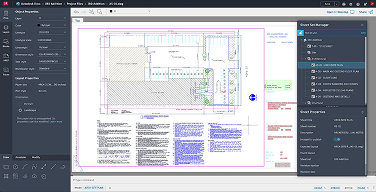
Unlock more efficient workflows
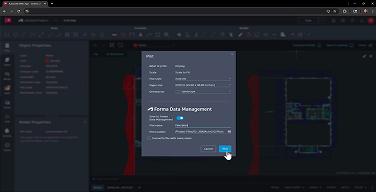
Work anywhere with AutoCAD on the web and on mobile
Enjoy a connected design experience with Autodesk AutoCAD across devices. Create, view, edit, and annotate drawings with AutoCAD on mobile or on any computer using AutoCAD on the web.
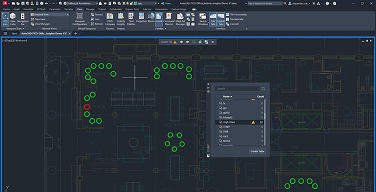
Customize your workspace and extend AutoCAD
Complete your work more quickly. Gain access to thousands of parts and additional features with industry-specific toolsets, APIs to automate common processes, and 1,000+ third-party apps.
Workflows
See how the specialized toolsets included with AutoCAD can save you valuable time
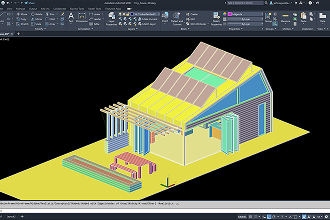
(Watch video 1:58 min.)
AutoCAD + Architecture toolset Speed up your architectural design process with the Architecture toolset.
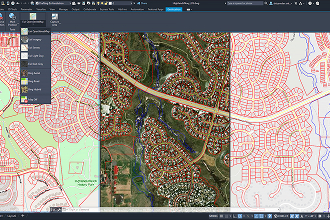
(Watch video 1:48 min.)
AutoCAD + Electrical toolset Save time on electrical designs with the Electrical toolset.
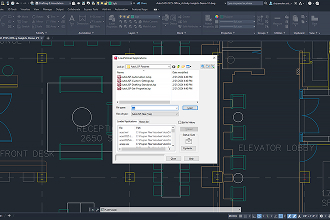
(Watch video 1:51 min.)
AutoCAD + Mechanical toolset Create mechanical designs faster using the Mechanical toolset.
Tailored to work for your industry
Autodesk AutoCAD includes product design and manufacturing industry-specific toolsets with features and intelligent objects to help you save time.*

Mechanical toolset
Up to 55% gain in overall productivity

Electrical toolset
Up to 95% gain in overall productivity

Raster Design toolset
Up to 48% gain in overall productivity

Architecture Engineering Construction Collection
Extend AutoCAD for product & production design
The Product Design & Manufacturing Collection helps engineers tackle their most ambitious projects with a powerful set of applications that extend the capabilities of AutoCAD and Inventor for end-to-end product development and facility layout.
Product Design & Manufacturing Collection includes:

Inventor

Navisworks Manage

Fusion

+ More

Factory Design Utilities
Exclusive to AutoCAD in the Product Design & Manufacturing Collection
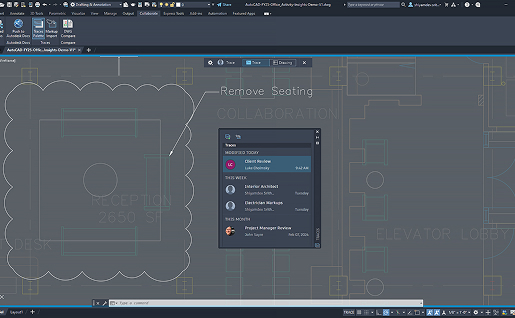
Integrate electromechanical models, conceptualize designs, and speed up the creation of manufacturing documentation.
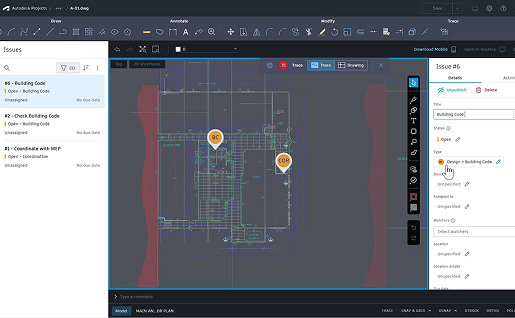
Design your entire production process with integrated factory layout and analysis tools.
Frequently Asked Questions
What is included in an AutoCAD license?
Every AutoCAD subscription includes the full desktop application, AutoCAD on the web and mobile, and the seven industry-specific toolsets: Architecture, Mechanical, Electrical, Map 3D, MEP, Plant 3D, and Raster Design. Starting with the current release, Forma Data Management Essentials is also included with standalone subscriptions, adding cloud DWG storage, version history, folder-level permissions, and markup tools at no additional cost. You also get TrustedDWG technology, access to more than 1,000 third-party apps, and Autodesk technical support.
How much does an AutoCAD license cost?
AutoCAD license price depends on three main variables: subscription term (monthly, annual, or three-year), license type (single-user or flex tokens), and volume. Annual and multi-year terms deliver the lowest effective cost per user, and multi-seat purchases often qualify for additional discounts. Teams that also use Revit, Civil 3D, or Inventor frequently find that a collection subscription lowers the total cost per application compared with buying licenses separately. Working with an authorized Autodesk partner gives you visibility into all available options before you commit.
What is new in AutoCAD 2027?
AutoCAD 2027 focuses on automation and connected collaboration. Autodesk Assistant is an AI-powered, context-aware in-product guide that lets you validate drawings against your own CAD standards through conversational prompts. Geometry Cleanup automatically detects and repairs gaps, overshoots, undershoots, and misaligned angles. Connected References preserve xref integrity when files are moved or renamed, with one-click repair from the Xref palette. The release also adds expanded 3D graphics performance and parallel editing on the web, so multiple users can work on the same DWG stored in Forma Data Management.
What is the difference between AutoCAD and AutoCAD LT?
AutoCAD LT is now part of the AutoCAD family as an entry-level option focused on 2D drafting and documentation. Full AutoCAD adds 3D modeling and visualization, the specialized toolsets, APIs and customization for automating repetitive processes, and support for third-party applications. If your team performs 2D production drawings only, LT may be sufficient. If you work in 3D, need discipline-specific content libraries, or plan to automate workflows, full AutoCAD is the better long-term investment.
What is the difference between a single-user license and flex tokens?
A single-user AutoCAD license is assigned to one named person who can sign in on up to three devices, though only one at a time. Flex is a token-based model designed for occasional users: you buy tokens in advance and consume them only on the days someone actually opens the product. Organizations with a core team of daily users plus a group of infrequent users often combine both models to reduce spend without limiting access. A usage analysis is the fastest way to identify which mix fits your team.
Do the specialized toolsets really improve productivity?
Does my subscription include access to previous AutoCAD versions?
Yes. An active AutoCAD subscription gives you rights to install and run several prior releases, which is essential when clients, consultants, or internal projects are still standardized on an earlier version. This lets teams migrate on their own schedule rather than forcing an immediate upgrade across every active project. Deployment planning should account for which versions your project files, plugins, and partners require.
How does MicroCAD support the purchase and deployment of AutoCAD?
As an authorized Autodesk partner, MicroCAD covers the complete lifecycle: license assessment, purchasing, deployment, training, and ongoing technical support. Our consultants review current usage, recommend the right license mix, configure standards and templates so teams see value quickly, and provide direct support afterward instead of leaving you to open tickets alone. As a nationally certified Minority Business Enterprise with multiple state and local certifications, MicroCAD also helps organizations meet supplier diversity objectives through the same procurement process.