
Helix
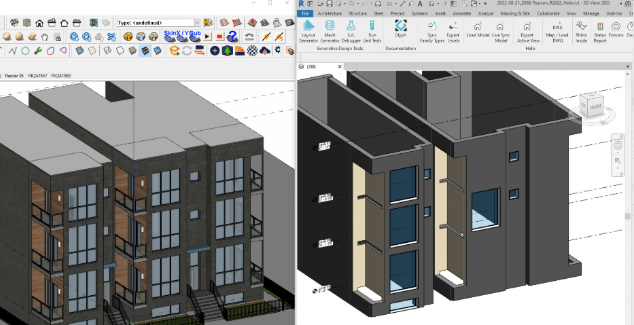
A powerful interoperability tool that bridges the gap between your BIM and design platforms. Helix converts SketchUp® and AutoCAD® models into native Revit® components, keeping geometry, context, and project intent intact. Sync your models effortlessly and maintain a smooth, coordinated workflow across tools.
Convert SketchUp Models into Native Revit Elements
Supported Revit Categories
Walls · Curtain Walls · Floors · Roofs · Ceilings · Pipes · Doors · Windows · Topography.
Key Features
- Map imported geometry by tag or material.
- Surface model health warnings for cleaner, safer imports.
- Track model updates—Revit only refreshes when SketchUp geometry changes.
Included Content
- Helix starter families with instance-based parameter calculations for door and window heights and widths
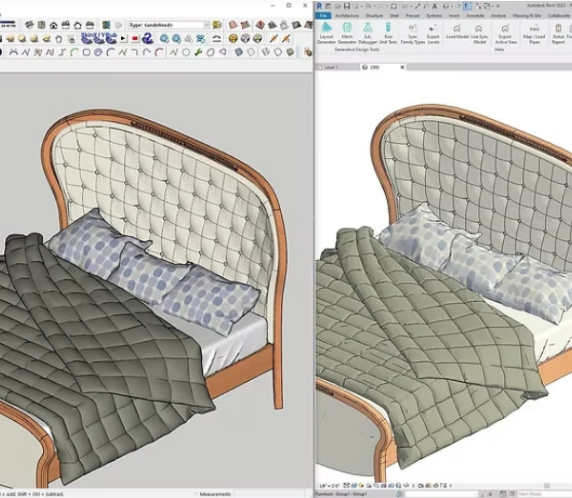

Seamless SketchUp-to-Revit Mesh Conversion
Supported Categories
Generic Models, Casework, Entourage, Furniture, Furniture Systems, Railings, Site, Light Fixtures, Planting, Specialty Equipment, Mechanical Equipment, Plumbing Fixtures, Columns
Key Features
- Clean mesh conversion with no extra triangulation, making geometry ready for documentation and visualization.
- Automatic creation of Revit materials, including texture support.
- Map SketchUp materials directly to Revit materials.
- Preserve SketchUp components and groups as Revit families with smart mesh-based instancing
Convert Revit Models for SketchUp
Features
- Optimize Revit geometry for clean, push/pull-ready SketchUp output.
- Reduce mesh density for better performance while preserving accurate form.
- Transfer Revit materials into SketchUp.
- Automatically map Revit materials to their SketchUp equivalents.
- Convert Revit levels into SketchUp planes, clearly tagged as levels.

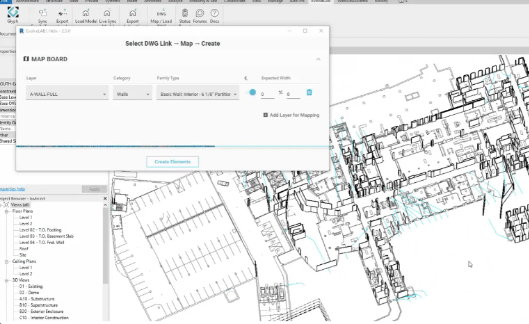
Convert AutoCAD Files to Revit
Supported Revit Categories
Walls, Doors, Windows, Railings, Room Separation Lines, Space Separation Lines, and Pipes.
Key Features
- Automatically detect AutoCAD center lines to correctly place Revit wall and MEP families.
- Streamline model conversion for faster, more accurate Revit setup.