
Autodesk AI in Manufacturing
AI that works inside your workflow not beside it
Autodesk AI in Manufacturing brings artificial intelligence directly into the tools your team already uses to design and make products. Instead of a separate app to learn, the AI lives inside Autodesk Fusion and works alongside you generating design options, drafting your drawings, and speeding up the path from CAD to a finished part. You stay in control. The AI handles the repetitive work.
Not a new tool. A smarter way to use the ones you have
Autodesk AI in Manufacturing isn’t a product you buy on its own. It’s a set of AI capabilities built into Autodesk’s design and manufacturing software
most of it inside Autodesk Fusion. It takes the slow, repetitive parts of product development (drawing production, exploring design variations, programming toolpaths) and either automates them or gives you a head start. The result is less time on busywork and more time on the decisions that actually need a human.
Autodesk AI shows up across four stages of the product lifecycle:

Design
Explore more concepts in less time. Set your goals and let AI generate and fill in design options for you.
Capabilities: Generative Design, Automated Modeling.

Engineer
Turn a finished model into documentation and validated engineering without the manual grind.
Capabilities: Automated Drawings, AI-assisted Simulation.

Make
Get from model to machine faster with AI that helps program and optimize your manufacturing.
Capabilities: Automated Manufacturing (CAM), Machining automation.

Manage
Keep your data connected and use it to spot problems and improve the next build.
Capabilities: Data insights, Autodesk Assistant.
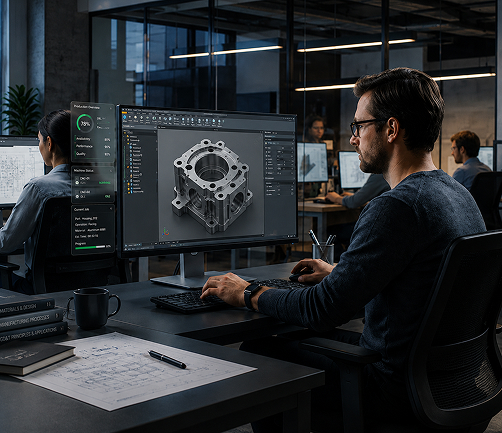
Same tools. Same files. Smarter workflow
- Built Into Your Tools
No new platform, no data export. The AI runs inside Fusion, right where you already design and manufacture. - You Stay in Control
Autodesk AI suggests, generates, and automates — but every option is yours to accept, edit, or reject. It’s an assistant, not an autopilot. - Trained for the Real Job
This isn’t generic AI bolted on. It’s built for the specific work of designing parts and making them geometry, drawings, and machining.
Every capability. Every phase
Autodesk AI in Manufacturing spans the full journey from first concept to finished part. Here’s what it does at each stage and where each capability lives.
Phase label: design
- Generative Design
Tell the software what the part needs to do the loads it carries, the material, the manufacturing method, the areas it can’t touch and it generates multiple valid design options for you to compare. Great for cutting weight and material while keeping strength.
Key capabilities: Goal and constraint setup, multiple outcomes side by side, manufacturing-aware options (CNC, additive, casting), performance comparison.
- Automated Modeling
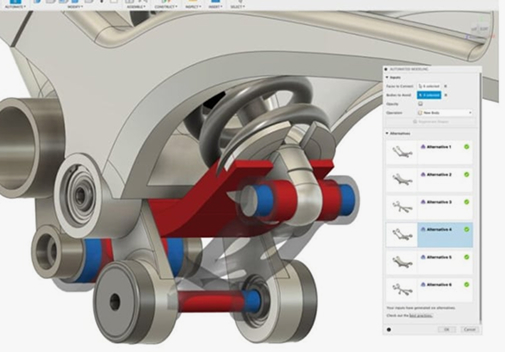
Select the components you’re working with and how they should connect, and Autodesk AI produces several ready-to-use design options that join them. It handles the tedious in-between modeling so you can focus on the concept.
Key capabilities: Component selection, connection preferences, multiple editable outputs, native Fusion geometry.
Phase label: design
- Generative Design
Tell the software what the part needs to do the loads it carries, the material, the manufacturing method, the areas it can’t touch and it generates multiple valid design options for you to compare. Great for cutting weight and material while keeping strength.
Key capabilities: Goal and constraint setup, multiple outcomes side by side, manufacturing-aware options (CNC, additive, casting), performance comparison.
- Automated Modeling
Select the components you’re working with and how they should connect, and Autodesk AI produces several ready-to-use design options that join them. It handles the tedious in-between modeling so you can focus on the concept.
Key capabilities: Component selection, connection preferences, multiple editable outputs, native Fusion geometry.
Engineer
- Automated Drawings
Turn a 3D model into a detailed manufacturing drawing in a fraction of the usual time. Autodesk AI places views, dimensions, and annotations automatically, giving you a strong first draft to refine instead of a blank sheet.
Key capabilities: Auto view placement, auto dimensioning, editable output, standards-ready drawings.
- AI-assisted Simulation
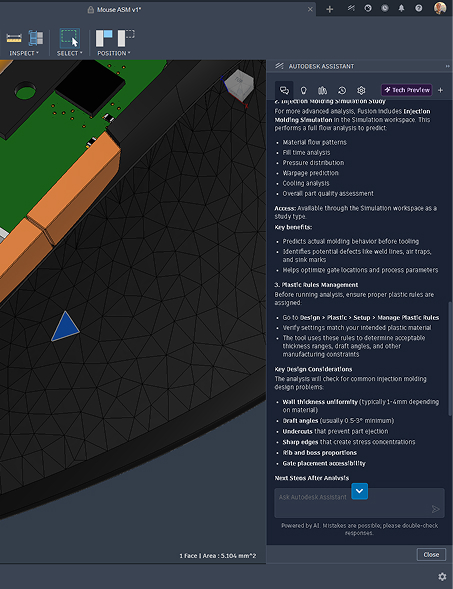
Run engineering analysis earlier and more often. AI helps speed up simulation setup and results so you can catch problems while they’re still cheap to fix — not after tooling.
Key capabilities: Faster setup, earlier validation, fewer physical prototypes.
Engineer
- Automated Drawings
Turn a 3D model into a detailed manufacturing drawing in a fraction of the usual time. Autodesk AI places views, dimensions, and annotations automatically, giving you a strong first draft to refine instead of a blank sheet.
Key capabilities: Auto view placement, auto dimensioning, editable output, standards-ready drawings.
- AI-assisted Simulation
Run engineering analysis earlier and more often. AI helps speed up simulation setup and results so you can catch problems while they’re still cheap to fix — not after tooling.
Key capabilities: Faster setup, earlier validation, fewer physical prototypes.
Make
- Automated Manufacturing (CAM)
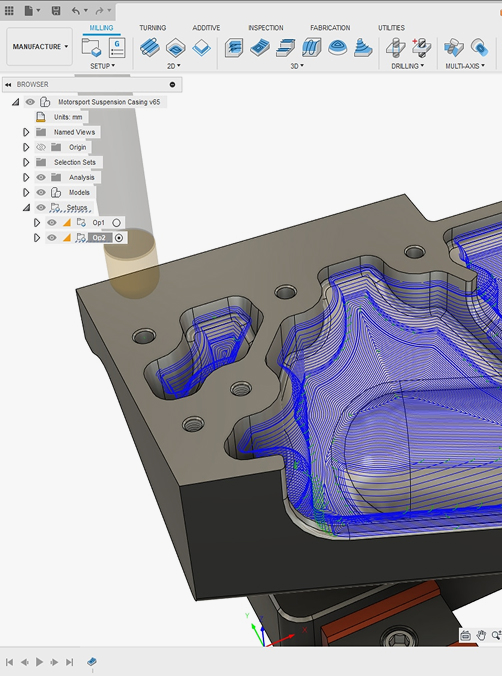
Autodesk AI helps program CNC machining by recognizing features and suggesting toolpaths, cutting the time it takes to go from a finished model to a running job. Less trial and error on the shop floor means less scrapped material and fewer reworks.
Key capabilities: Feature recognition, toolpath assistance, setup automation, fewer manual errors.
Make
- Automated Manufacturing (CAM)
Autodesk AI helps program CNC machining by recognizing features and suggesting toolpaths, cutting the time it takes to go from a finished model to a running job. Less trial and error on the shop floor means less scrapped material and fewer reworks.
Key capabilities: Feature recognition, toolpath assistance, setup automation, fewer manual errors.
Manage
- Data Insights & Autodesk Assistant
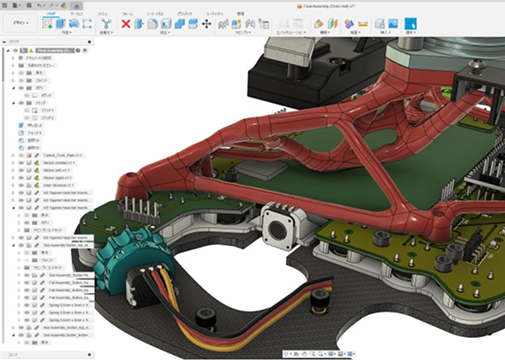
With your design and manufacturing data connected in one place, Autodesk AI helps you find answers faster through the built-in Autodesk Assistant and surfaces patterns that help you improve the next project instead of repeating the last one’s mistakes.
Key capabilities: In-product AI assistant, connected project data, insights for continuous improvement.
Manage
- Data Insights & Autodesk Assistant
With your design and manufacturing data connected in one place, Autodesk AI helps you find answers faster through the built-in Autodesk Assistant and surfaces patterns that help you improve the next project instead of repeating the last one’s mistakes.
Key capabilities: In-product AI assistant, connected project data, insights for continuous improvement.
Manage
Many of Autodesk’s most advanced AI-powered capabilities become available through Fusion extensions add-ons that expand what Fusion can do without changing how you work.
- Generative Design Extension
Unlock full goal-driven design exploration and generate optimized part options across multiple manufacturing methods. - Machining Extension
Automate and extend your CAM with advanced toolpath strategies and probing for more efficient CNC production. - Simulation Extension
Run deeper structural, thermal, and other analyses to validate designs before you commit to tooling.
Works with the tools you already run
Autodesk AI doesn’t replace your design and manufacturing setup. It connects to it.

Inventor
Move mechanical designs between Inventor and Fusion and keep AI capabilities in the loop.

AutoCAD
Bring 2D drawings and mechanical detailing into your connected workflo.

Vault
keep every version and revision organized as your team designs and manufactures.

Fusion Manage
Connect product data and processes across the business (PLM).

Factory Design Utilities
Plan and lay out production floors with data that flows through Fusion.

Navisworks
Coordinate large assemblies and manufacturing models for review.
Put Autodesk AI to work across your entire product process
Autodesk AI capabilities come built into Autodesk Fusion, which is included in the Product Design & Manufacturing Collection. Get Fusion, Inventor, AutoCAD, Navisworks, Factory Design Utilities, and Vault in one cost-effective package — with AI running throughout.